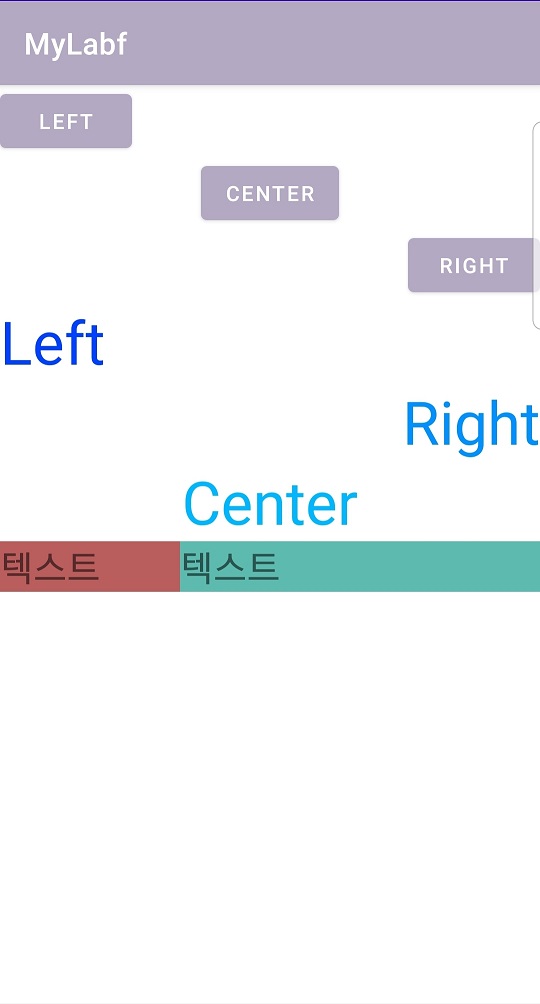
○ LinearLayout에서 gravity, width, weight 등을 통한 정렬
- activity_layout2.xml 혹은 activity_main.xml
<?xml version="1.0" encoding="utf-8"?>
<LinearLayout xmlns:android="http://schemas.android.com/apk/res/android"
    xmlns:app="http://schemas.android.com/apk/res-auto"
    xmlns:tools="http://schemas.android.com/tools"
    android:layout_width="match_parent"
    android:layout_height="match_parent"
    android:orientation="vertical"
    tools:context=".Layout2">

    <Button
        android:id="@+id/buttonLeft"
        android:layout_width="wrap_content"
        android:layout_height="wrap_content"
        android:text="LEFT" />

    <Button
        android:id="@+id/buttonCenter"
        android:layout_width="wrap_content"
        android:layout_height="wrap_content"
        android:layout_gravity="center"
        android:text="CENTER" />

    <Button
        android:id="@+id/buttonRight"
        android:layout_width="wrap_content"
        android:layout_height="wrap_content"
        android:layout_gravity="right"
        android:text="RIGHT" />

    <TextView
        android:id="@+id/textViewLeft"
        android:layout_width="match_parent"
        android:layout_height="wrap_content"
        android:gravity="left"
        android:textColor="#0040FF"
        android:textSize="40dp"
        android:text="Left" />

    <TextView
        android:id="@+id/textViewRight"
        android:layout_width="match_parent"
        android:layout_height="wrap_content"
        android:gravity="right"
        android:textColor="#0090FF"
        android:textSize="40dp"
        android:text="Right" />

    <TextView
        android:id="@+id/textViewCenter"
        android:layout_width="match_parent"
        android:layout_height="wrap_content"
        android:gravity="center_horizontal|center_vertical"
        android:textColor="#00B7FF"
        android:textSize="40dp"
        android:text="Center" />

    <LinearLayout
        android:layout_width="match_parent"
        android:layout_height="match_parent"
        android:orientation="horizontal">

        <TextView
            android:id="@+id/textView5"
            android:layout_width="0dp"
            android:layout_height="wrap_content"
            android:textSize="25dp"
            android:layout_weight="1"  ///layout_width="0dp"으로함으로써 비율대로 크기 할당
            android:background="#BA5D5D"
            android:text="텍스트" />

        <TextView
            android:id="@+id/textView4"
            android:layout_width="0dp"
            android:layout_height="wrap_content"
            android:textSize="25dp"
            android:layout_weight="2"
            android:background="#5DBAAF"
            android:text="텍스트" />
    </LinearLayout>
</LinearLayout>
- Layout2.java
package com.example.mylabf;

import androidx.appcompat.app.AppCompatActivity;

import android.os.Bundle;

public class Layout2 extends AppCompatActivity {

    @Override
    protected void onCreate(Bundle savedInstanceState) {
        super.onCreate(savedInstanceState);
        setContentView(R.layout.activity_layout2);
    }
}
- 실행 화면